
Mercedes-Benz MB.OS Explained: What Birmingham Drivers Should Know
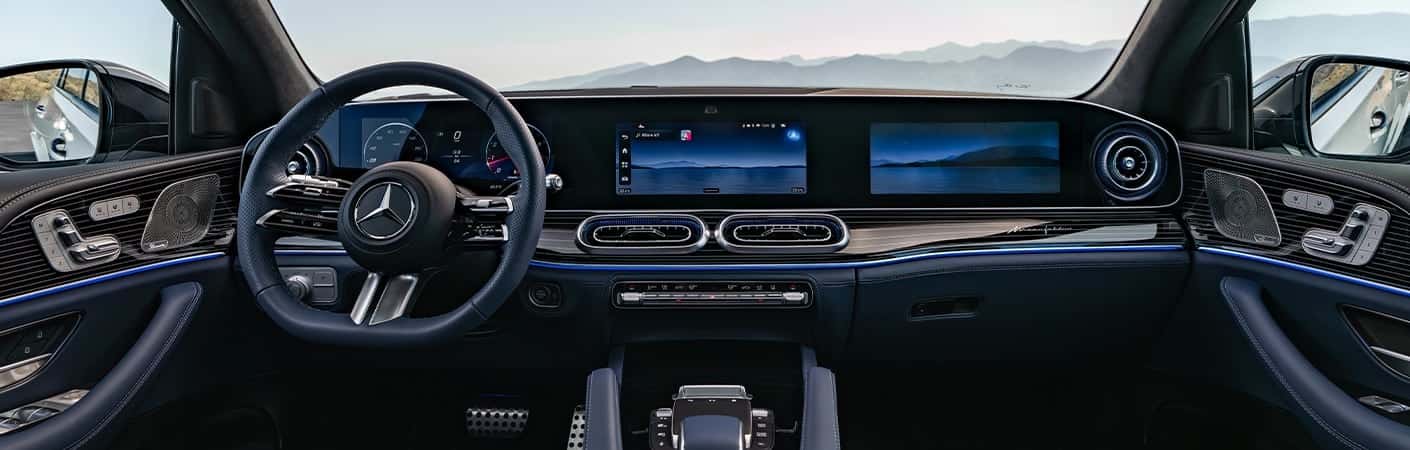
Mercedes-Benz vehicles are entering a new software generation built around MB.OS, the Mercedes-Benz Operating System. Rather than serving as another touchscreen interface, MB.OS creates a common digital foundation for infotainment, driver-assistance technology, cabin comfort, powertrain functions, charging, and connected services.
The system first reached production in the new-generation Mercedes-Benz CLA and is expanding into upcoming vehicles such as the GLE, GLS, S-Class, and GLB. For Birmingham drivers, MB.OS should mean more natural voice controls, closer integration between vehicle systems, improved navigation, and software that can continue receiving compatible updates after the vehicle leaves the dealership.
What Is Mercedes-Benz MB.OS?
MB.OS stands for Mercedes-Benz Operating System. It is a proprietary vehicle architecture developed to connect software, electronic hardware, sensors, cloud services, and driver-facing features within a unified framework. Mercedes-Benz refers to it as a chip-to-cloud system because it links components inside the vehicle with compatible online services and remote software infrastructure.
Older vehicles often rely on a collection of individual control units and software environments that manage separate functions. MB.OS reduces some of that fragmentation by creating common standards across the vehicle. This can allow new features to be developed and deployed more efficiently while giving Mercedes-Benz greater control over how different systems work together.
Is MB.OS the Same as MBUX?
No. MB.OS and MBUX are related, but they are not the same thing. MB.OS is the underlying software and hardware foundation, while MBUX is the interface occupants use to control navigation, media, climate settings, profiles, and other features.
| System | Primary Role | How Drivers Interact With It |
|---|---|---|
| MB.OS | Underlying vehicle operating system | Usually works in the background to connect vehicle domains and software |
| MBUX | Infotainment and user interface | Screens, voice commands, profiles, media, navigation, and settings |
| MB.DRIVE | Driver-assistance and parking technology | Available steering, speed, lane, traffic, and parking assistance functions |
The simplest way to understand the difference is that MB.OS is the foundation, MBUX is the interface, and MB.DRIVE covers assistance and parking systems. A vehicle may also use an MBUX Superscreen or another display arrangement, but the screen itself is not MB.OS. Read our guide to how the MBUX Superscreen changes daily driving in Alabama for a closer look at the visible side of the technology.
What Are the Four MB.OS Domains?
Mercedes-Benz divides MB.OS into four primary domains. Each domain covers a different group of vehicle systems, but the shared architecture allows them to exchange information and operate more consistently.
Infotainment
The infotainment domain supports MBUX, navigation, audio, entertainment, personal profiles, voice assistance, and compatible applications. It is the part of MB.OS that occupants interact with most directly through the vehicle’s screens and controls.
Automated Driving
This domain provides the software foundation for compatible MB.DRIVE driver-assistance and parking functions. Depending on the vehicle and selected equipment, those systems may help with following distance, lane positioning, traffic signals, steering support, or low-speed maneuvering. They remain assistance features, and the driver is responsible for controlling the vehicle.
Body and Comfort
The body and comfort domain can connect functions such as seating, climate control, ambient lighting, doors, windows, and other cabin settings. Greater integration can allow multiple settings to work together through profiles or automated comfort routines instead of requiring each function to be adjusted separately.
Driving and Charging
The driving and charging domain supports powertrain management, energy use, vehicle dynamics, and charging functions. In an electric Mercedes-Benz, this can include route planning, predicted energy consumption, charging-stop selection, and battery preparation before reaching a compatible fast charger.
How Does Artificial Intelligence Work With MB.OS?
Fourth-generation MBUX uses MB.OS to support a more conversational virtual assistant. Instead of requiring the driver to repeat a complete command every time, the system can maintain context through follow-up questions and respond in a way that feels closer to a normal conversation.
A driver could ask for a coffee shop along the current route, ask which nearby option has the strongest rating, and then request directions without repeating the location or route information. The Zero Layer interface can also surface functions based on the current situation, reducing the number of menus required for frequently used controls.
Personal profiles can store numerous preferences for seating, media, navigation, climate, and display settings. In compatible vehicles, facial recognition or another authentication method can activate the appropriate profile. The exact AI functions, supported languages, applications, and profile features will vary by model and available services.
How Does MB.OS Change Mercedes-Benz Navigation?
MB.OS allows navigation to work more closely with the vehicle instead of functioning as a separate map application. New Mercedes-Benz navigation systems can use Google Maps technology while maintaining the brand’s own interface, vehicle data, route displays, and available augmented reality functions.
For Birmingham drivers, connected routing can help account for congestion on I-65, I-20, I-459, and Highway 280. Live traffic information may suggest a different route when an accident or construction creates delays, while available augmented reality navigation can place directional guidance over a live camera image of the road ahead.
Electric Mercedes-Benz vehicles add another layer of integration. Navigation with Electric Intelligence can consider traffic, elevation, temperature, energy use, charging availability, and the vehicle’s estimated range when planning a trip. It may also prepare the battery before reaching a compatible charger so the vehicle can accept energy more effectively under the right conditions.
What Can MB.OS Update Over the Air?
MB.OS is designed to support over-the-air software delivery. Compatible updates can be installed through the vehicle’s data connection rather than requiring every software change to be completed during a dealership visit.
Depending on the model and equipment, updates may affect navigation data, infotainment functions, the virtual assistant, compatible Digital Extras, vehicle settings, and certain driver-assistance software. Mercedes-Benz can also add or revise supported applications and services as the system develops.
An update cannot add physical equipment that was not installed when the vehicle was built. A vehicle without the necessary cameras, radar sensors, display hardware, or comfort equipment will not gain those parts through a download. Certain updates may also require sufficient battery charge, cellular coverage, account activation, or acceptance of revised terms.
What Are Mercedes-Benz Digital Extras?
Digital Extras are connected and software-based Mercedes-Benz features that can operate in the vehicle or through the Mercedes-Benz app. Examples may include remote services, live traffic information, navigation functions, entertainment features, assistance capabilities, or vehicle upgrades available for compatible models.
Some Digital Extras include an initial service period with a new vehicle, while others may require purchase or renewal. Activation can require a Mercedes me ID, acceptance of the Digital Extras terms, and pairing the vehicle with the owner’s account. Cellular or GPS access may also be necessary for connected features to work.
The Mercedes-Benz app allows owners to pair a compatible vehicle, review its status, use available remote controls, manage charging information, and access the Mercedes-Benz Store. Available features vary by model, model year, equipment, and subscription status.
Does MB.OS Control the Entire Vehicle?
MB.OS reaches beyond the center display because its architecture includes infotainment, assistance, comfort, driving, and charging domains. That does not mean every Mercedes-Benz with MB.OS will have the same capabilities. The software can coordinate only with the hardware and equipment installed in that particular vehicle.
A CLA, GLE, GLS, and S-Class may all use MB.OS while offering different screens, suspension systems, seating functions, powertrains, and assistance packages. The shared platform is intended to make the underlying software more consistent, not make every vehicle identical.
Which Mercedes-Benz Models Have MB.OS?
The new-generation 2027 Mercedes-Benz CLA was the first production model launched around MB.OS. Mercedes-Benz is now extending the architecture across its next generation of sedans, SUVs, electric vehicles, and performance models.
Confirmed upcoming applications include vehicles such as the updated GLE, GLS, S-Class, and all-new GLB. The exact MBUX interface, available Digital Extras, display layout, and assistance features will differ among those models even though they share the MB.OS foundation.
Birmingham drivers can view current Mercedes-Benz CLA inventory or browse the new Mercedes-Benz inventory to see which vehicles are currently available. Additional MB.OS-equipped models will appear as their respective launch schedules progress.
What Does MB.OS Mean for Mercedes-Benz Ownership?
The most important change may be how the vehicle develops after purchase. A traditionally designed infotainment system is largely fixed when the vehicle leaves the factory, aside from smaller map or software updates. MB.OS gives Mercedes-Benz a more flexible platform for delivering compatible improvements, revised functions, and new services over time.
Owners may also see more consistency when moving between future Mercedes-Benz models. Profiles, voice controls, navigation behavior, and menu structures can follow a common logic even when screen size and equipment differ. Closer integration can also allow navigation, climate, charging, comfort, and assistance functions to share information more effectively.
There are practical limitations. Some connected features require subscriptions, cellular service, GPS access, or a paired Mercedes me account. Digital Extras may be updated, discontinued, limited by region, or offered only on certain vehicles. Over-the-air software can enhance compatible hardware, but it cannot replace regular maintenance or repair a mechanical problem.
How Does Mercedes-Benz Address Privacy With MB.OS?
Mercedes-Benz states that personalized data use depends on customer approval and is subject to data-protection and transparency requirements. Owners can expect some connected functions to require account permissions because services such as personalized profiles, remote access, cloud-based navigation, and software delivery depend on vehicle and account data.
Mercedes-Benz has also published AI principles centered on responsible use, explainability, privacy protection, safety, and reliability. The exact data used by a feature will depend on the service, region, and selected permissions. Owners should review the applicable privacy notices and Digital Extras terms when pairing a vehicle or activating connected services.
When Can Birmingham Drivers Try MB.OS?
MB.OS is reaching the market through the new Mercedes-Benz CLA and will become more common as the next generation of Mercedes-Benz models arrives. Upcoming GLE, GLS, GLB, S-Class, and additional electric models will bring different implementations of the same underlying architecture.
Drivers should evaluate the complete vehicle rather than choosing solely based on the operating system. Screen layout, assistance packages, charging capability, cabin features, and available Digital Extras will still differ by model. Mercedes-Benz of Birmingham can help confirm which MB.OS, MBUX, and connected features are included on a particular vehicle.
Mercedes-Benz MB.OS FAQs
What does MB.OS stand for?
MB.OS stands for Mercedes-Benz Operating System. It is the central software and hardware architecture used to connect infotainment, driver assistance, cabin comfort, powertrain, charging, and cloud-based services.
Is MB.OS replacing MBUX?
No. MB.OS is the underlying operating system, while MBUX remains the user interface for screens, navigation, media, voice control, profiles, and vehicle settings.
Does MB.OS use artificial intelligence?
Yes. MB.OS supports the latest MBUX virtual assistant, personalization, contextual suggestions, and other AI-supported functions. Exact capabilities depend on the model and available services.
Can MB.OS receive over-the-air updates?
Yes. Compatible software, navigation functions, Digital Extras, and other features may be updated remotely when the required account, vehicle hardware, battery level, and connectivity conditions are met.
Which Mercedes-Benz vehicle received MB.OS first?
The new-generation Mercedes-Benz CLA was the first production model introduced with MB.OS.
Do MB.OS features require a subscription?
Some functions are included with the vehicle, while certain Digital Extras may require activation, a trial period, a separate data connection, or paid renewal. Availability varies by vehicle and service.
Learn More About Mercedes-Benz Technology in Birmingham
MB.OS provides the foundation for the next generation of Mercedes-Benz technology, linking visible MBUX features with assistance systems, cabin settings, vehicle controls, charging functions, and cloud services. Its value will depend less on one individual screen and more on how effectively those systems work together during daily use.
Browse new Mercedes-Benz vehicles online or contact Mercedes-Benz of Birmingham for help comparing MB.OS, MBUX, Digital Extras, and available technology packages.
Shop New Mercedes-Benz Vehicles Contact Mercedes-Benz of Birmingham